JSW One is a B2B e-commerce platform for steel and construction materials, built for MSMEs, small and medium businesses that procure large volumes of industrial goods. These aren't casual shoppers. They're procurement managers, site engineers, and business owners who deal with multi-SKU orders, ledger balances, advance payments, freight charges, and compliance documentation every day.
The checkout flow didn't reflect any of that. Click "place order," land on a payment page, make a decision about money with almost no information visible. For a consumer buying a ₹500 product that's fine. For an MSME committing to a ₹5 lakh steel order, it isn't.
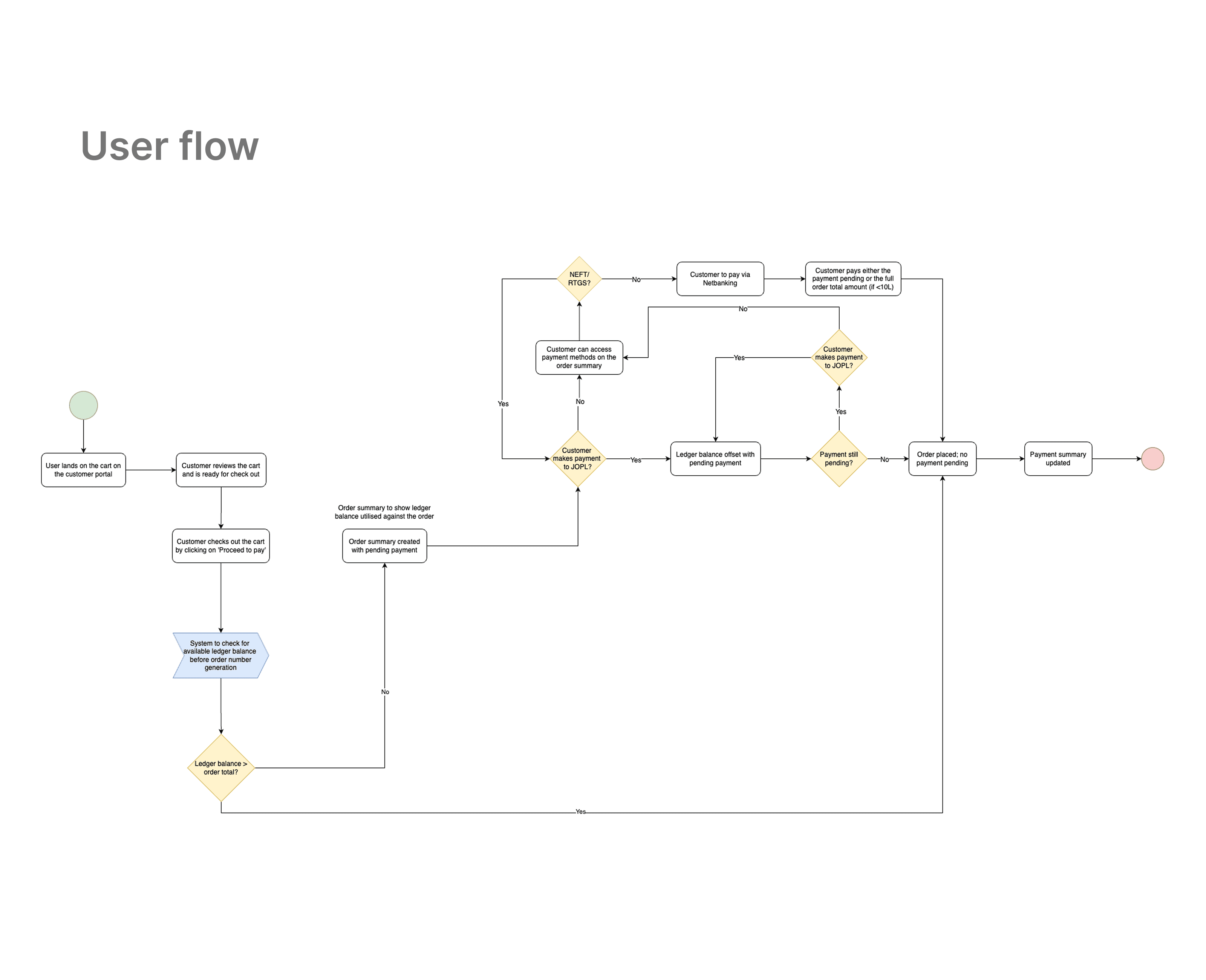
The original flow sent users directly from cart to payment. No summary. No order confirmation. No visibility into what they were paying for before they paid for it.
The result was a high drop-off rate at the payment stage. Not because users didn't want to buy, but because they hit a payment screen with incomplete context and backed out to check details they couldn't see. By the time they came back, the moment was gone.
There was a second problem underneath the first one. Once an order was placed, it wasn't accessible anywhere useful. If a user needed to come back and pay later, common in B2B procurement where approvals take time, there was no clear place to find it.
I needed to solve both: give users the right information before payment, and create a persistent order state they could return to.
The interface uses a familiar chat format, shoppers describe products in their own words, slang included. During a busy mall visit, nobody wants to learn a new app. They want an answer.
I built the AI to understand natural language the way Gen Z actually uses it, not formal search syntax. That shift made the product feel less like a search engine and more like texting someone who actually knows.
Onboarding was built around demonstration, not explanation. New users saw the AI do something useful in their first 30 seconds, no feature tour, just an actual result. That cut onboarding time by 40% and stopped users from bouncing before they hit any value.
Decision 2: Seven information modules, strict hierarchy
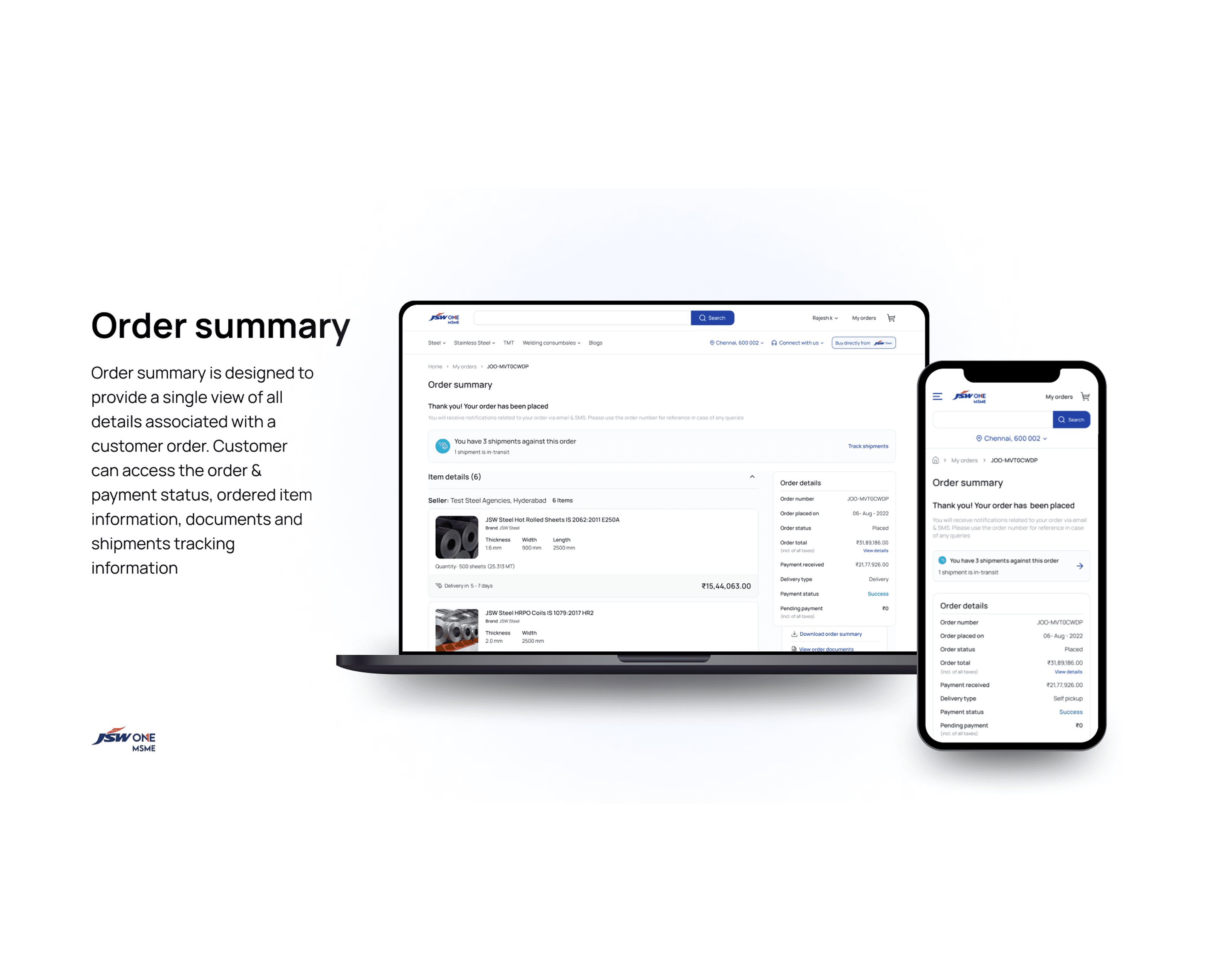
The order summary page needed to show a lot. Order details, seller information, payment summary, payment methods, delivery details, SKU details, shipment tracking. That's not a problem to solve with more space, it's a problem to solve with sequence.
I organized by the questions a procurement manager actually asks in order: What did I order? Who am I buying from? What do I owe? How do I pay? When does it arrive? What exactly is being shipped?
Each module answers one question. The sequence matches the mental order users process them. Nothing is hidden in a tab that requires a second click to find critical information.
Decision 3: Ledger balance as a first-class element
MSMEs on JSW One often have a running ledger balance, advance payments they've made that sit as credit. The original flow buried this. Users had to know to look for it.
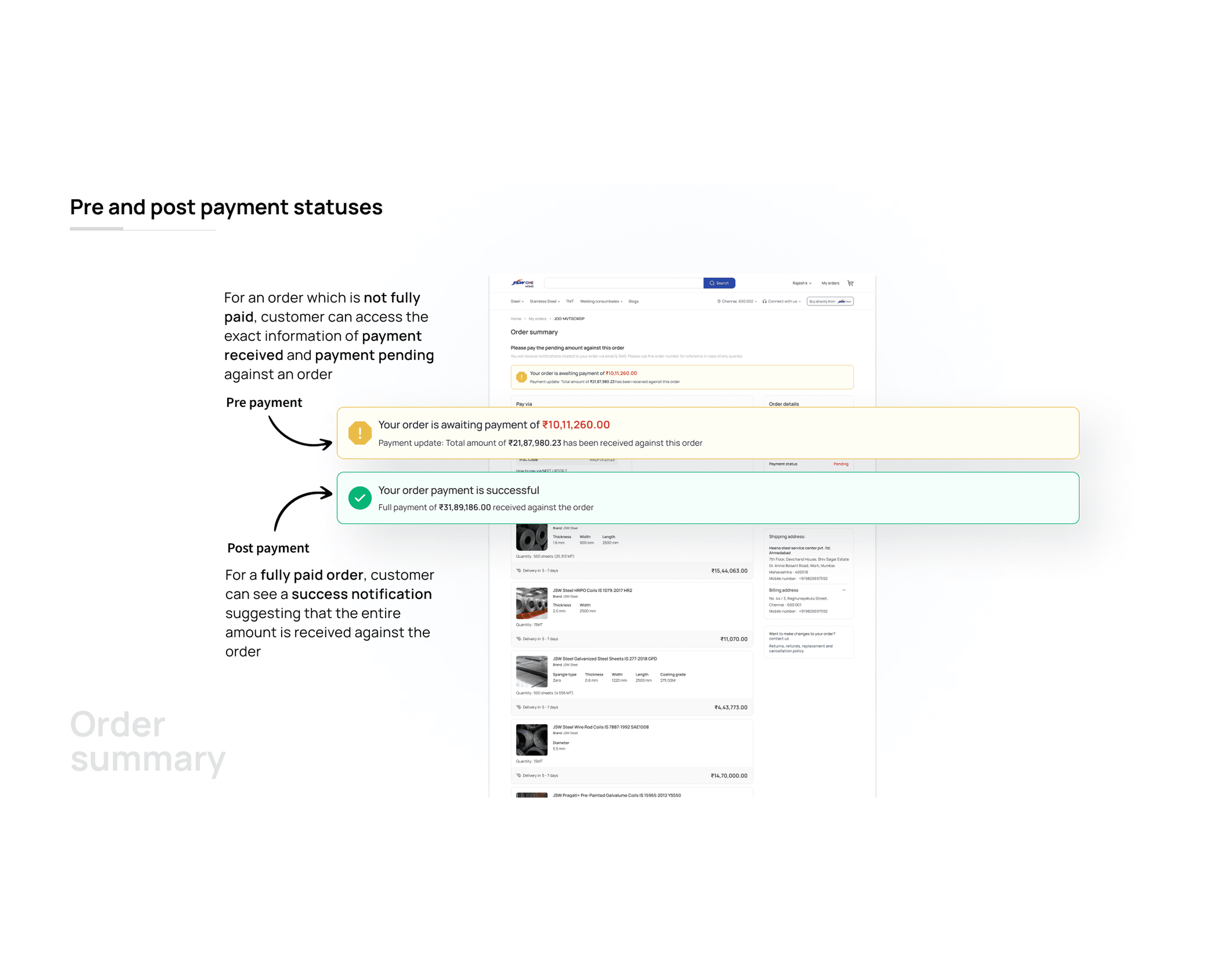
I surfaced ledger balance prominently in the payment summary and wired it to the "Make Payment" section. If the ledger balance exceeds the order amount, the payment section hides automatically, the order is handled. If it falls short, the difference is shown clearly with the remaining amount due. This wasn't a nice-to-have. For MSME buyers managing cash flow across multiple orders, this visibility directly affects whether they complete a purchase or defer it.
Decision 4: PDF download scoped intentionally
The downloadable Order Summary PDF was a stakeholder request. The instinct was to put everything in it. I argued against including shipment data.
The reason: shipment data changes. A PDF downloaded on day one of an order is stale by day three. Including live-tracking data in a static document creates a support problem users share the PDF with their site manager, the delivery window shown is wrong, and someone has to explain why. Keeping the PDF to order, payment, delivery, SKU, and seller details keeps it accurate and useful for its actual purpose: documentation and sharing.
Understanding the User
MSME buyers aren't shopping. They're managing. A procurement manager handling a ₹50 lakh monthly steel budget needs to track every order across multiple sellers, reconcile payments against ledger balances, share documentation with their finance team, and coordinate deliveries with site managers often from a phone, often mid-conversation with someone else.
The competitive benchmark was Amazon's My Orders → View Order flow. Same fundamental structure: list view to detail view. The difference is what lives in the detail view. Amazon shows you a product. JSW One's order summary shows you a financial transaction with logistics, compliance documents, multi-seller visibility, and payment state all in one place.
The design had to hold up for someone checking a single 3-SKU order and for someone managing a complex multi-seller order with partial shipments and a mixed payment state. Both users hit the same page.
01 / 04
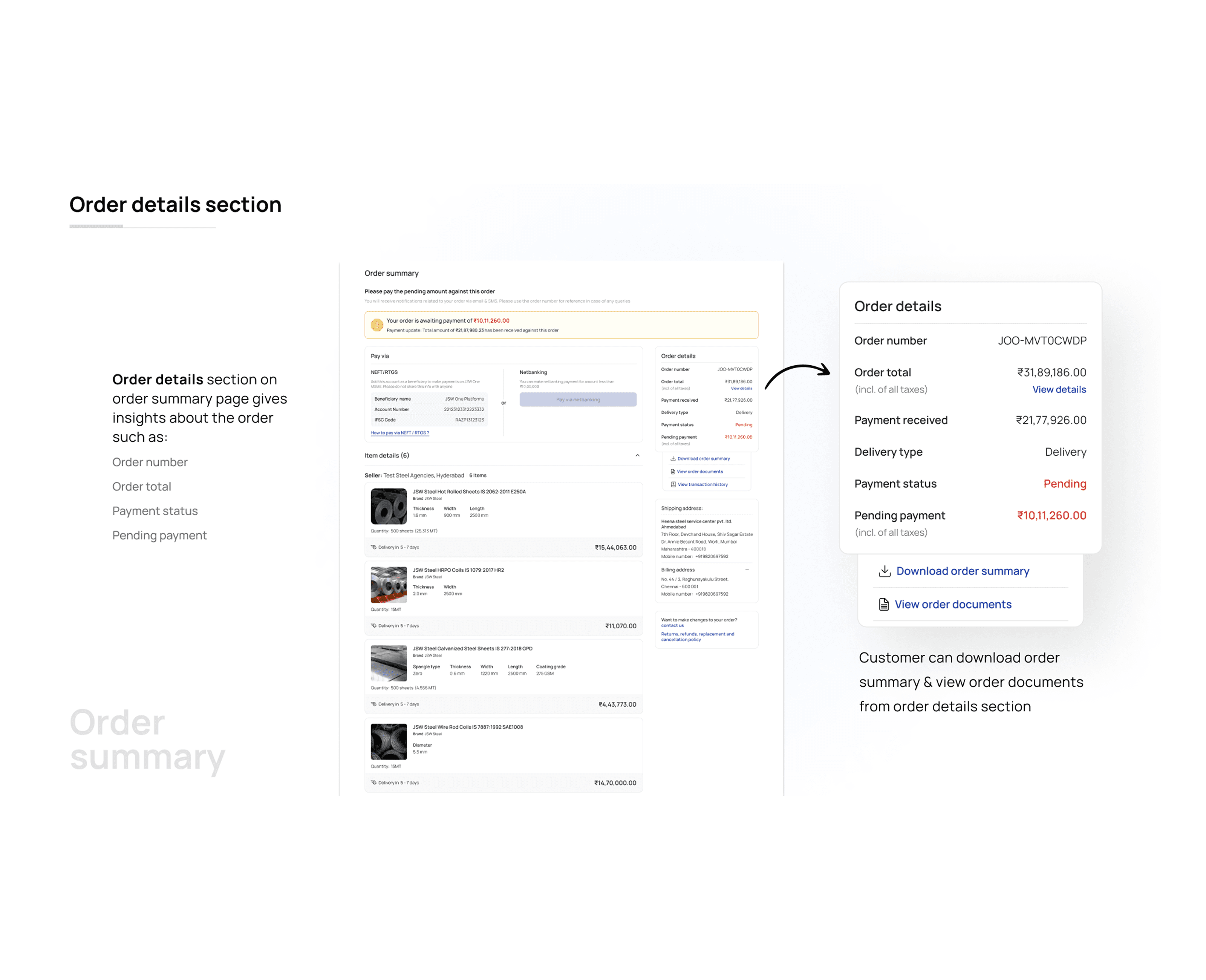
Introduces the new flow. After placing an order, users land here instead of the payment page. The order is already created. The summary gives them complete visibility before they decide to pay.
02 / 04
Handle two distinct moments: before payment (pending, with payment options visible and ledger balance shown) and after payment (confirmed, with the payment section collapsed and receipt information surfaced).
The same page, two states, no separate screens for the user to navigate between.
03 / 04
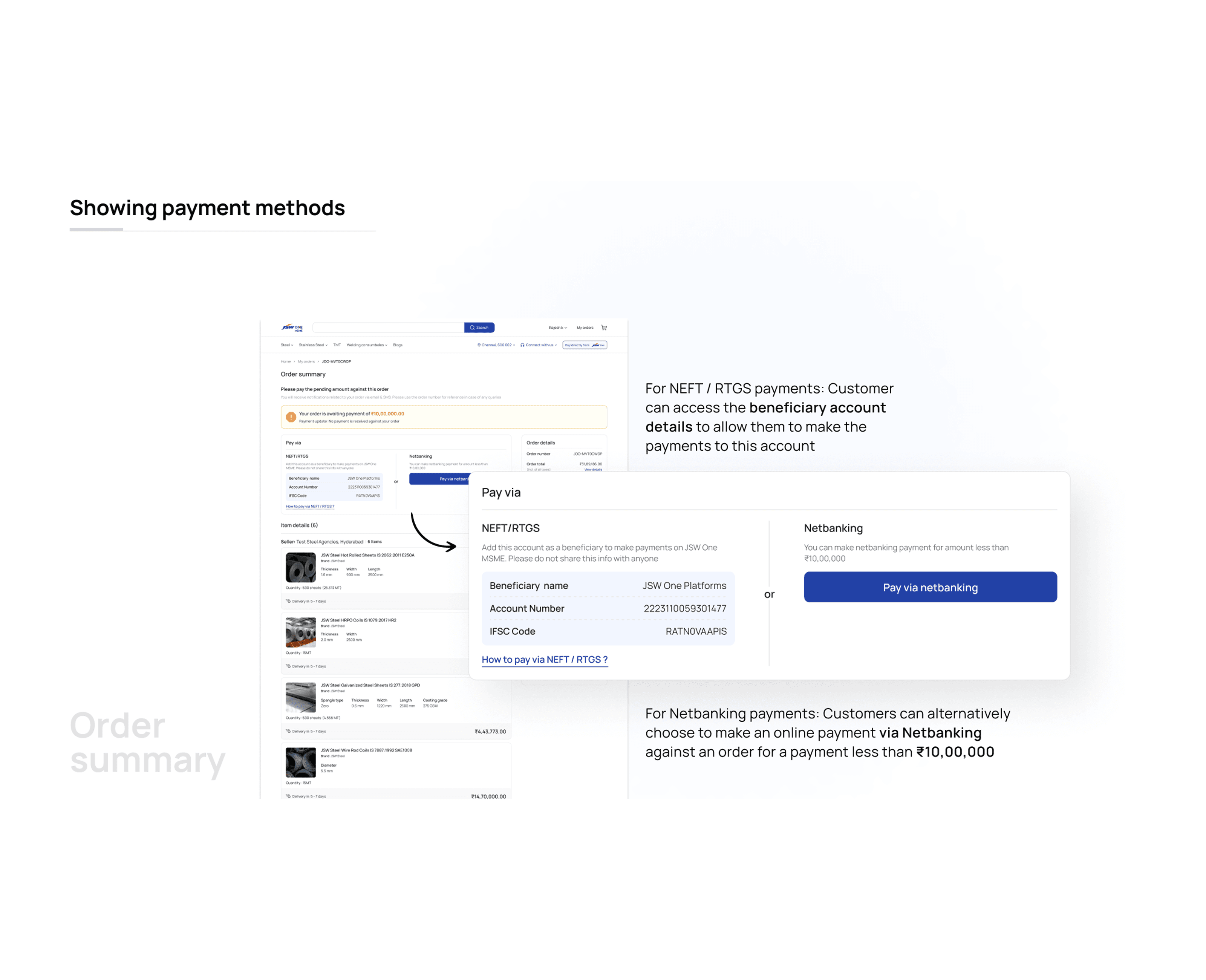
Methods are shown inline within the summary rather than on a separate payment page. For B2B payments between ₹5,000 and ₹5,00,000, the method choice matters; NEFT, RTGS, cheque, and ledger settlement behave differently and have different timelines. Showing them in context, next to the balance and amount due, gives users what they need to make that decision without leaving the page.
04 / 04
This sits at the top of the summary order number, order date, order status, and total amount. The section also surfaces seller information and pickup address for applicable order types. This is the first thing a procurement manager checks when they come back to an order days later.
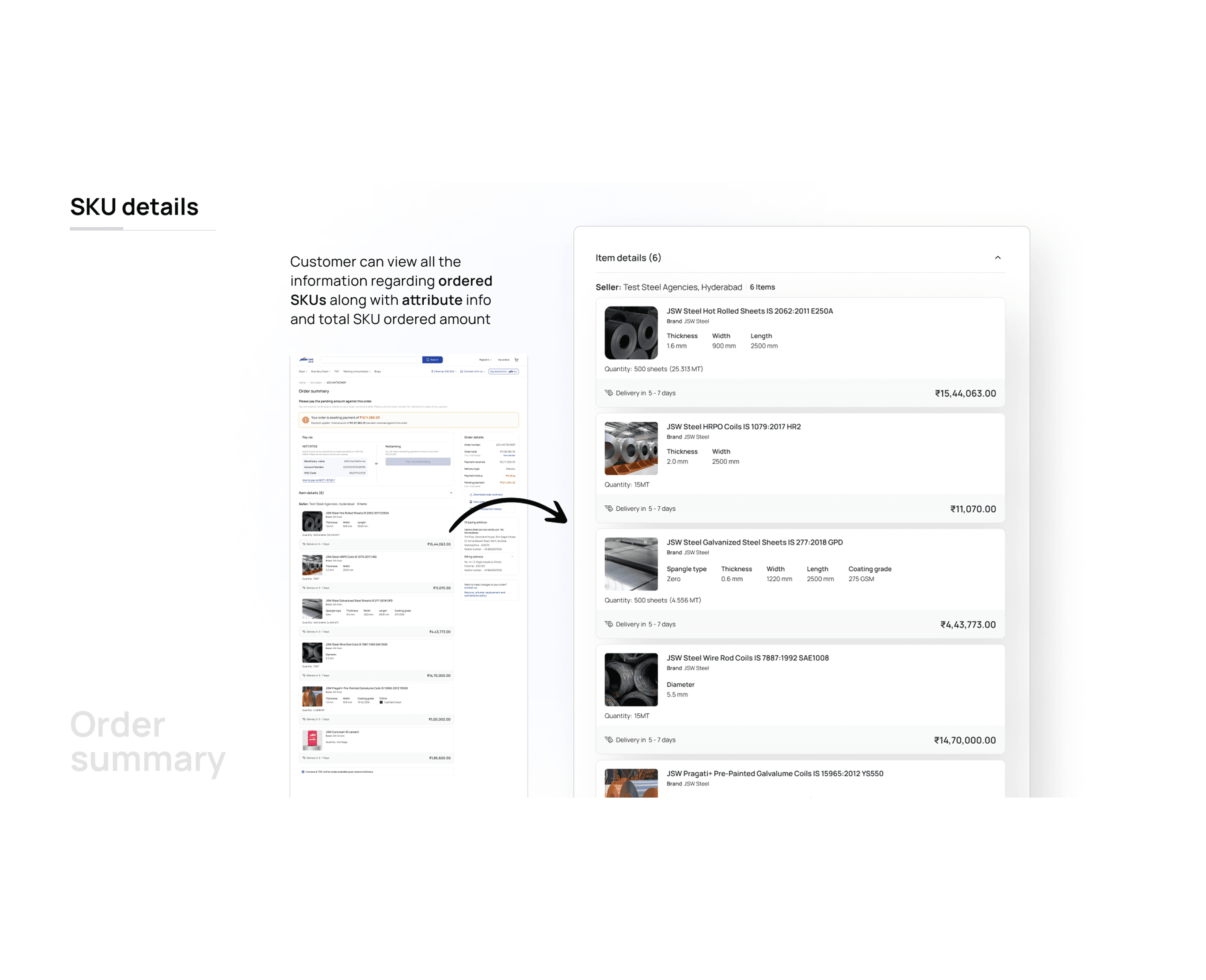
This shows product variant, quantity, per-unit price, total ordered price, and estimated delivery timeline per line item. For multi-SKU orders, this becomes a ledger in itself. The section is designed so a site manager can read it and know exactly what to expect, without needing to call anyone.
2% → 28% cart-to-order conversion rate after inserting the order summary step.
26-point lift in conversion from one structural change, no new features, just better sequencing.
Drop-off at payment stage reduced significantly once users had full order context before committing.
What I'd Push Further
The ledger balance auto-reconciliation logic, where the payment section hides when the balance covers the order, works well for clean cases. Edge cases are messier. Partial ledger coverage, credit limits, and advance payment expiry. I'd want to run those scenarios with real procurement managers before calling the logic complete.
The multi-seller SKU view works at the page level but gets dense on mobile for orders with 5+ sellers and 10+ SKUs. I'd explore a seller-first accordion structure for that specific scenario, collapsed by default, expanded on tap, rather than the current flat list that requires significant scrolling.